|
How
to Make a Cut List
If you are working off a 30 frames per second video edit,
you may or may not be able to output a key number cut list
from your system, depending upon if you have software such
as Slingshot or Media Matchback. If you don't have the software,
or if you are editing on workprint, you will need to create
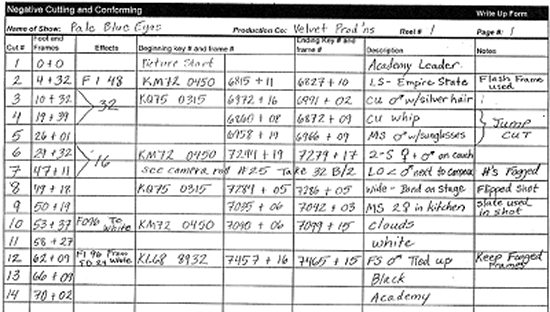
a cut list, or "write-up" for your negative cutter. Writing-up
your cut list is simple, so long as you are consistent with
a few basic guidelines. Or, we would be happy to do this for
you.)
CLICK
HERE
to download the above as a blank form for your write-up. (Microsoft
Word)
When
writing up a workprint edit, it is important to "zero out"
the sync block so that your foot and frame counter reads 0
feet + 0 frames on the "Picture Start" frame of the Academy
leader. This will result in the "first frame of picture" being
4+32 in 16mm, and 12+0 in 35mm.
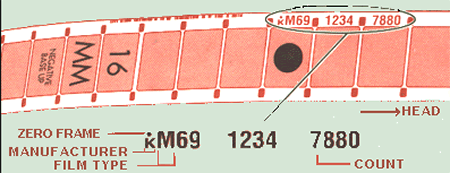
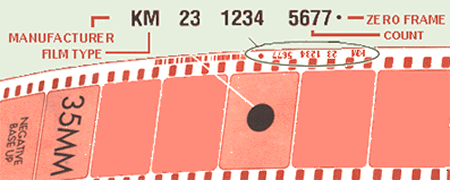
It is important to know which frame is the "zero frame", and
be consistent with it. The zero frame, whether you are working
in 16mm or 35mm, is always the frame with the dot running
on top of or beside the key number on that frame. This is
the frame that the key number refers to (e.g. KM74 5342 7654+00).
In most 16mm stock, the key numbers run every 20 frames (1/2
foot).
One exception is 16mm Ilford stock. On this stock key numbers
run every 40 frames (one foot) and there is no dot. Also,
there is no consensus on which frame is the zero frame. The
key is simply to be consistent in establishing where your
zero frame is and communicate clearly about your choice.
In most 35mm stock the key numbers run every 16 frames (one
foot). The dot will always be closest to one perf. The frame
that relates to that perf is the zero frame.
Counting from head to tail, each frame after the zero frame
is counted as +1, starting again at the point of the next
dot, or zero frame. For example, if the first frame of a shot
begins 15 frames after the KM72 0450 5224 zero frame, then
the beginning key number will be KM72 0450 5224+15. If this
shot ends six frames after the KM72 0450 5227 zero frame the
ending key number would be KM72 0450 5227+6. If a shot begins
or ends on a zero frame, it is counted as "+0".
When
writing up cut workprint, for the beginning key number you
will have to assume the "count" number (sometimes called the
"running" key number), since all plus frames are after the
zero frame, which will not be present in your cut workprint.
Simply count one backwards from the first visible "count"
number in that shot.
The large black circle in the zero frame in the above figures
represents the hole punch made by your lab at the beginning
of each camera roll, if your negative was prepped for telecine
.
The "FI" and "FO" that you see written in the "Effects" column,
stand for "Fade In" and "Fade Out". The arrows which you see
bridging shots in the effects column represent dissolves.
The numbers written beside these FI's, FO's, and arrows represent
the length in frames of the effects. When writing your dissolves,
be sure to give us the entire frame length of your dissolve,
but in giving us the key numbers involved in the dissolve,
you only need to give us the center of the dissolve, just
as they are present in your cut workprint.
The negative cutter assumes a 2 frame gap (16mm) or a 1 frame
gap (35mm) between cut backs, for splicing purposes. Be sure
to indicate any shots, where there are less than these frames
in any given place on your write up, for a cut to be accurate
there must always be at least a one frame gap.
While not included on this sample write-up sheet, it is important
to list the camera roll number for each individual cut. This
information can usually be found in your script supervisor's
reports. (You can place this information in the "Notes" column.)
The "Description" of each shot is a useful reference for the
negative cutter, but we consider it optional.
Marking
your workprint
Materials
requirements | Download
forms
|